Block GPTBot and Other AI Crawlers in WordPress robots.txt
Block GPTBot, ClaudeBot and other AI crawlers in WordPress robots.txt, see what each block costs you, and know which bots a robots.txt rule cannot stop.

TL;DR: Add User-agent: GPTBot and Disallow: / to robots.txt to keep OpenAI’s training crawler out. Every major AI operator documents its own token, and the tokens do different jobs: some feed model training, some feed AI search answers, and some fetch a page only when a user asks. Block the training tokens and you lose nothing in search. Block the search tokens and you drop out of those answers. The user-triggered fetchers may ignore robots.txt entirely, by their operators’ own account. The table below lists each token, what blocking it costs, and the operator’s own page.
To stop GPTBot from crawling a WordPress site, add these lines to your robots.txt:
User-agent: GPTBot
Disallow: /
That is the whole fix for a crawler that follows the file. Keep in mind what the file is: a request. robots.txt tells a crawler which paths it may fetch, and a crawler that ignores the standard reads the same file and fetches what it likes anyway. The question that decides whether this page is the right fix for you is whether the bot you are fighting is one that reads the file.
AI crawler tokens and what blocking each one costs
Each row comes from the operator’s own documentation, checked on 2026-11-16. “Costs you” is what that operator says happens when you disallow the token.
| Token | Operator | What the operator says it does | What Disallow: / costs you | Operator page |
|---|---|---|---|---|
GPTBot | OpenAI | Crawls content that may be used to train its generative AI foundation models | Nothing in ChatGPT search, which uses OAI-SearchBot | OpenAI: Overview of OpenAI crawlers |
OAI-SearchBot | OpenAI | Surfaces websites in ChatGPT’s search features | Your pages are not shown in ChatGPT search answers, though they can still appear as navigational links | OpenAI: Overview of OpenAI crawlers |
ChatGPT-User | OpenAI | Fetches a page when a ChatGPT user asks for it | OpenAI says robots.txt rules may not apply to these user-initiated fetches | OpenAI: Overview of OpenAI crawlers |
ClaudeBot | Anthropic | Collects web content that could contribute to model training | Your future content is excluded from Anthropic’s training datasets | Anthropic: crawler and site owner FAQ |
Claude-SearchBot | Anthropic | Indexes the web to improve search results in Claude | Your content is not indexed for Claude’s search | Anthropic: crawler and site owner FAQ |
Claude-User | Anthropic | Fetches pages when a Claude user asks a question | Claude cannot retrieve your page to answer that user | Anthropic: crawler and site owner FAQ |
PerplexityBot | Perplexity | Surfaces and links websites in Perplexity search; Perplexity says it is not used to crawl content for AI foundation models | Your pages drop out of Perplexity’s search results | Perplexity: Perplexity crawlers |
Perplexity-User | Perplexity | Fetches pages for user actions inside Perplexity | Perplexity says this fetcher generally ignores robots.txt | Perplexity: Perplexity crawlers |
Google-Extended | A token, not a separate crawler: controls whether content Google crawls may train and ground Gemini models | Nothing in Google Search. Google says it does not affect inclusion or ranking | Google: common crawlers | |
Applebot-Extended | Apple | A token, not a crawler: controls whether Applebot’s data may train Apple’s foundation models | Nothing in Apple search. Pages can still appear in Spotlight, Siri and Safari | Apple: About Applebot |
Amazonbot | Amazon | Improves Amazon products and services, and may be used to train Amazon AI models | Your pages leave that crawl | Amazon: Amazonbot |
Amzn-SearchBot | Amazon | Improves search experiences in Amazon products and services; Amazon says it does not crawl for generative AI model training | Amazon says allowing it makes your content eligible for search experiences such as Alexa, so blocking it gives that up | Amazon: Amazonbot |
CCBot | Common Crawl | Builds Common Crawl’s open repository of web crawl data, which anyone can download and reuse | Your pages are left out of future Common Crawl archives | Common Crawl: CCBot |
Bytespider | ByteDance | No operator documentation found | Unknown | None found |
Three things in that table matter more than the rest.
Training and search are separate tokens. OpenAI and Anthropic each run one crawler for training and another for search. OpenAI states that each setting is independent of the others. Amazon also runs a separate search agent: it says Amazonbot may be used to train Amazon AI models and Amzn-SearchBot does not crawl for generative AI model training. Blocking GPTBot and ClaudeBot keeps your content out of training and leaves you in ChatGPT and Claude search answers.
Google-Extended and Applebot-Extended are not crawlers. Nothing fetches your pages under those names. Googlebot and Applebot do the crawling, and the extended token tells each company whether it may use the result for model training. That is why blocking them costs nothing in Google or Apple search.
User-triggered fetchers are the gap. When a person asks ChatGPT or Perplexity to read your page, OpenAI says robots.txt “may not apply” and Perplexity says its fetcher “generally ignores robots.txt rules”. Amazon says the same of its Amzn-User agent. A Disallow line for those agents is a request their operators have already said they may not follow.
Which tokens to block, by goal
| Your goal | Block these | Leave these alone |
|---|---|---|
| Keep content out of AI training, stay in AI search | GPTBot, ClaudeBot, Google-Extended, Applebot-Extended, Amazonbot, CCBot | OAI-SearchBot, Claude-SearchBot, PerplexityBot, Amzn-SearchBot |
| Stay out of AI search answers as well | Everything above, plus OAI-SearchBot, Claude-SearchBot, PerplexityBot, Amzn-SearchBot | Googlebot, unless you also want out of Google Search |
| Stop user-triggered fetches | robots.txt is not reliable here; use a server or CDN rule | |
| Stay out of Google’s AI Overviews | No robots.txt token does this. Google points to nosnippet, data-nosnippet, max-snippet or noindex | Google-Extended, which Google’s AI features page mentions only for “AI training and grounding in some of Google’s other systems” |
The rules for the first row, which is what most site owners mean by “block AI”:
User-agent: GPTBot
Disallow: /

User-agent: ClaudeBot
Disallow: /

User-agent: Google-Extended
Disallow: /

User-agent: Applebot-Extended
Disallow: /

User-agent: Amazonbot
Disallow: /

User-agent: CCBot
Disallow: /
What independent reports found
The table describes what each operator says about its own bots. Outside testing does not always agree. In October 2024, Fortune reported research by the bot-detection firm Kasada finding that ByteDance’s Bytespider did not respect robots.txt, and the same research said that of OpenAI’s and Anthropic’s crawlers too. ByteDance did not respond to Fortune. In August 2025, Cloudflare reported that after it blocked Perplexity’s declared crawlers, the same content was fetched by an undeclared crawler using a generic Chrome user agent from IP addresses outside Perplexity’s published ranges. In the same post, Cloudflare said ChatGPT-User stopped fetching when it was disallowed.
So treat robots.txt as the first layer. It works for every crawler that follows it, and it is the opt-out each operator documents. It does nothing against a bot that ignores it or hides behind a browser user agent.
Adding the rules in WordPress
WordPress answers /robots.txt itself when no file by that name exists in your web root, and its output runs through the robots_txt filter. You can append AI-crawler rules from a plugin or a must-use plugin:
add_filter( 'robots_txt', function ( $output, $public ) {
    $output .= "\nUser-agent: GPTBot\nDisallow: /\n";
    return $output;
}, 10, 2 );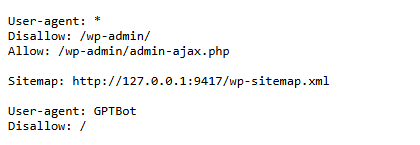
A real robots.txt file in your web root overrides all of this. The web server serves it directly, WordPress never runs, and the filter above has no effect. We tested this on 2026-11-16 in WordPress Playground (WordPress 7.1.4, PHP 8.3). With the filter active, /robots.txt ended with the GPTBot group. With a static file added and the filter still active, the static file was served unchanged and the GPTBot group was gone. Removing the file brought the filtered output back. The WordPress robots.txt best-practice guide covers why WordPress ignores your robots.txt edits in that case, and what the rest of the file should contain.
If you would rather not hand-write the groups, the robots.txt generator has a toggle for every token in the table above except Amzn-SearchBot, which you can add by hand. It sorts them the same way: model training, AI search, and pages a user asks for. It shows the full file before you paste it.
After any change, fetch https://yoursite.com/robots.txt in a private window. Do not trust a plugin’s preview pane. OpenAI says it can take about 24 hours for a robots.txt change to reach its search results.
When you need enforcement
robots.txt depends on the crawler’s cooperation. To refuse the request outright, block at the server. In .htaccess on Apache, put this above the # BEGIN WordPress line:
<IfModule mod_rewrite.c>
RewriteEngine On
RewriteCond %{HTTP_USER_AGENT} (GPTBot|CCBot|ClaudeBot|Bytespider) [NC]
RewriteRule .* - [F,L]
</IfModule>
Placed there, it returns 403 to anything sending those user agents. Placed below WordPress’s block, it misses every permalink. WordPress’s last rule sends the request to index.php with [L]. Apache’s documentation says that in an .htaccess file, [L] “stops the current pass through the ruleset, but the rewritten request may be re-processed from the top”. On that second pass, WordPress’s RewriteRule ^index\.php$ - [L] line stops it again, so a rule further down never runs. The default WordPress .htaccess file shows that block and where custom rules go. Our .htaccess generator can assemble the rest of the file around it. The limit is the same as before: user agents are easy to fake, so this stops only the bots that name themselves, which are mostly the ones that already follow robots.txt.
The stronger check is the source IP. OpenAI, Anthropic, Perplexity and Common Crawl publish their crawler IP ranges as JSON files, linked from the operator pages in the table. A firewall or CDN rule can then tell a real GPTBot from a scraper borrowing its name. Anthropic warns that blocking its IP addresses may not work correctly, so use its list to verify requests rather than as your only block. A CDN may also have its own AI crawler setting. Cloudflare’s AI crawler and agent access policies have a Block action for each behavior (search, agent and training), and each policy covers verified bots and matching unverified ones.
What not to do
Do not block Google-Extended expecting to leave AI Overviews. AI Overviews come from the regular Search index that Googlebot crawls. Google’s documentation on AI features says the controls are the same preview controls used for normal snippets: nosnippet, data-nosnippet, max-snippet, or noindex. Blocking Google-Extended changes none of that, and it does not cost you anything in Search either.
Do not treat robots.txt as a security control. It is public and advisory. Listing a private path in it publishes a map of where to look. Protect real endpoints with authentication.
Do not rely on noai or noimageai meta tags. Neither is among the robots meta rules in Google’s robots meta tag specification, and the operators in the table above document robots.txt tokens as their opt-out instead.
Do not assume a “block AI” plugin did more than write robots.txt. Most of them write the same lines you could write by hand, with the same limits. If the thing you want gone is an AI writing panel in the dashboard rather than a crawler, see how to disable WordPress AI features, including the core switch added in WordPress 7.0.
Do not confuse this with llms.txt. Blocking a crawler and publishing an llms.txt file pull in opposite directions: one keeps a crawler out, the other hands a cooperative one a curated map. Read whether WordPress llms.txt does anything before you spend time on it.
Sources
- WordPress Developer Resources: do_robots(), robots_txt filter
- IETF: RFC 9309, Robots Exclusion Protocol
- OpenAI: Overview of OpenAI crawlers
- Anthropic: Does Anthropic crawl data from the web, and how can site owners block the crawler?
- Perplexity: Perplexity crawlers
- Google: Google’s common crawlers (Google-Extended), AI features and your website, Robots meta tag specifications
- Apple: About Applebot
- Amazon: Amazonbot
- Common Crawl: CCBot
- Cloudflare: Perplexity is using stealth, undeclared crawlers to evade website no-crawl directives, AI Crawler and Agent access policies
- Apache HTTP Server 2.4: mod_rewrite, RewriteRule flags
William Lopez is the founder of Odie Themes. He builds the free WordPress tools and themes on this site and has been on WordPress.org since December 2019.
FAQ
Questions
How do I stop ChatGPT from crawling my WordPress site?
OpenAI uses three agents. Add "User-agent: GPTBot" and "Disallow: /" to keep your content out of model training, and a second group for OAI-SearchBot if you also want out of ChatGPT search answers. ChatGPT-User fetches pages when a person asks ChatGPT to, and OpenAI says robots.txt rules may not apply to those fetches.
Why is GPTBot still in my logs after I blocked it?
First fetch yoursite.com/robots.txt and confirm the rule is in the file crawlers actually get, because a static file on disk replaces WordPress's virtual one. Then compare the request IP with the list OpenAI publishes at openai.com/gptbot.json. Anyone can send a GPTBot user agent, so a request from another IP is not OpenAI.
Does blocking Google-Extended hurt my Google rankings?
No. Google-Extended is a robots.txt token, not a separate crawler, and Google says it does not affect a site's inclusion in Google Search or act as a ranking signal. It controls whether Google may use your content to train and ground Gemini models. It does not keep you out of AI Overviews, which are built from the Search index.
Do AI crawlers actually obey robots.txt?
The operators of GPTBot, ClaudeBot, PerplexityBot, Google-Extended, Applebot-Extended, Amazonbot and CCBot all document robots.txt as the way to opt out. OpenAI and Perplexity say their user-triggered fetchers may not follow it. Independent reports from Kasada and Cloudflare have caught crawlers fetching pages they were told to skip.
How do I block AI bots at the server level instead of robots.txt?
Return 403 to their user agents with a mod_rewrite rule in .htaccess, or a CDN or firewall rule. User agents are easy to fake, so this only stops bots that identify themselves. OpenAI, Anthropic, Perplexity and Common Crawl publish their crawler IP ranges as JSON, which lets a firewall check that a request really comes from them.