WordPress Child Theme Not Working? Fix CSS Not Loading
Child theme CSS not loading? WordPress itself never loads a child style.css. Enqueue it with the parent's real handle, and spot the parents that need none.

TL;DR: WordPress itself never enqueues a child theme’s style.css. It only reads the Template: line for template fallback and stops. You call wp_enqueue_style() yourself inside a function hooked to wp_enqueue_scripts in the child’s functions.php, and you list the parent theme’s real stylesheet handle as a dependency so the child file loads after it. Get the handle wrong and WordPress does not just load the file in the wrong order: it drops your child stylesheet entirely. Skip @import; it’s slower and isn’t how the current enqueue is documented.
Your child theme’s style.css is not loading because nothing asked WordPress to load it. The enqueue lives in the child theme’s functions.php, and when it fails it almost always fails in one of three ways: it isn’t there at all, it names a parent handle that doesn’t exist, or it has no dependency, so your rules land in the wrong place in the cascade and get overridden. Fix the enqueue and the styles come back. The old @import trick you probably copied from a 2013 tutorial is the wrong fix.
Why it happens
A classic child theme needs only one file: a style.css with a header block naming the parent. Most also have a functions.php. The header’s Template: line tells WordPress which parent to inherit templates from, and that is the only thing WordPress does automatically. It never enqueues your child style.css on the front end.
The parent theme, meanwhile, enqueues its stylesheet from its functions.php, hooked to wp_enqueue_scripts. Your child functions.php runs first, then the parent’s, then everything on that hook fires. If your child never calls wp_enqueue_style for its own file, the browser never requests it. You are looking at the raw parent theme, because that is all that loaded.
There is one exception, and it causes the opposite bug. Some classic parents enqueue their stylesheet with get_stylesheet_uri(). That function returns the active theme’s style.css, so once your child is active, the parent’s code loads your file under its handle, and the parent’s own style.css never loads at all. The site looks unstyled even though your child file is in the page source.
The load-order failure is subtler. You enqueue the child stylesheet, it loads, but your overrides do nothing. When two rules have equal specificity, the one that loads last wins. This isn’t a WordPress quirk, it’s the CSS cascade itself: the W3C’s Cascade and Inheritance spec says “the last declaration in document order wins” once origin, importance and specificity are tied. If your child CSS loads before the parent’s, the parent wins every tie. To force the order, use the dependency array on wp_enqueue_style.
One more thing people get wrong: get_template_directory_uri() points at the parent theme folder, and get_stylesheet_directory_uri() points at the active (child) theme folder. Swap them and you enqueue the parent’s style.css a second time and never touch the child’s.
What we measured
We ran each of these on 2026-11-16 in WordPress Playground (WordPress 7.1.4, PHP 8.3, WP_DEBUG off). A must-use plugin recorded every “doing it wrong” notice, so the notices below were captured even though nothing appeared on screen.
| Child theme setup | What the page source showed | Notice recorded |
|---|---|---|
Twenty Twenty-Five child, dependency twenty-twenty-four-style (a handle that doesn’t exist) | No child stylesheet at all | The style with the handle "child-style" was enqueued with dependencies that are not registered: twenty-twenty-four-style. |
Same child, dependency twentytwentyfive-style | Child <link> right after the parent’s styles | None |
Same child, wp_enqueue_style() at the top level of functions.php | Child stylesheet still loaded, near the top of <head> | Scripts and styles should not be registered or enqueued until the wp_enqueue_scripts, admin_enqueue_scripts, or login_enqueue_scripts hooks. |
Twenty Twenty-Four child, dependency twentytwentyfour-style | No child stylesheet; Twenty Twenty-Four registers no theme stylesheet | The same “dependencies that are not registered” notice |
Twenty Twenty-Four child, dependency array() | Child stylesheet loaded | None |
Classic parent that enqueues get_stylesheet_uri(), child with only a style.css | The parent’s handle pointing at the child’s style.css; parent CSS missing | None |
Same, child enqueues get_parent_theme_file_uri( 'style.css' ) | Parent file, then child file | None |
Two things in that table are worth remembering. A wrong handle fails silently on a live site, because the notice only shows with WP_DEBUG on. And Twenty Twenty-Five’s stylesheet is small enough that WordPress printed it inline, as <style id="twentytwentyfive-style-inline-css">, so searching the source for a <link> with that id finds nothing.
Match your symptom
| What you see | Likely cause | Fix |
|---|---|---|
No child style.css in the source, no notice | The enqueue never runs, or functions.php has a fatal error | Add the enqueue below; check debug.log for a fatal |
No child style.css, and debug.log has “enqueued with dependencies that are not registered” | Wrong parent handle | Use the handle from the parent’s page source, or array() if the parent registers none |
Child style.css loads under the parent’s handle, parent styling gone | Parent enqueues get_stylesheet_uri() | Enqueue the parent file yourself with get_parent_theme_file_uri( 'style.css' ) |
| Child loads, but before the parent’s stylesheet | No dependency | Add the parent’s handle to the dependency array |
| Parent CSS loads twice | You enqueued the parent under a second handle, such as parent-style | Drop your parent enqueue and depend on the parent’s own handle |
| Child CSS loads twice, under two handles | The parent already enqueues the child’s style.css (GeneratePress does, as generate-child) and you enqueued it again | Remove your own child enqueue |
| Child loads last and rules still lose | Specificity, or a cached file | Bump the child’s Version: header; then fix the selectors |
| The child is listed under Broken Themes | The Template: line doesn’t match the parent’s folder name | Fix the Template: line (see the end of this guide) |
The fix, in order
First, confirm what’s actually loading. Open the broken page, view source, and search for your child theme folder name. WordPress renders an enqueued stylesheet as <link id="handle-css" href="...">, or as <style id="handle-inline-css"> when it inlines a small file. If your child style.css isn’t in the <head> at all, the enqueue isn’t running or its dependency is wrong. If it is there but styles don’t apply, it’s an order problem.
Second, find the parent’s real handle. Most modern themes already enqueue their own stylesheet under a specific handle. You need that exact string: grep the parent theme, or read it off the page source and drop the -css or -inline-css suffix. If your parent isn’t in this short list, view source is the reliable way to get the real string rather than guessing:
| Parent theme | Stylesheet handle to use as the dependency |
|---|---|
| Astra | astra-theme-css (read from Astra 4.14.3 source) |
| GeneratePress | generate-style (read from GeneratePress 3.6.1 source; not generate-style-css, a common guess that doesn’t match the real handle). GeneratePress also loads the child’s style.css itself, so read the note under the first code example |
| Twenty Twenty-Five | twentytwentyfive-style (tested above) |
| Twenty Twenty-Four | None. It registers no theme stylesheet, so use array() (tested above) |
| Any other theme | Read it from the page source, dropping the -css or -inline-css suffix |
This table shows the problem: well-known themes use different handle strings for the same job, and one uses none. There’s no universal 'parent-style' handle to hardcode, which is exactly the Codex-era mistake covered below.
Third, write the enqueue. For the common case where the parent already loads its own stylesheet, you do not re-enqueue the parent. You only enqueue the child, and list the parent’s handle as a dependency so yours loads after it:
<?php
add_action( 'wp_enqueue_scripts', 'child_enqueue_styles', 20 );

function child_enqueue_styles() {
    wp_enqueue_style(
        'child-style',
        get_stylesheet_directory_uri() . '/style.css',
        array( 'astra-theme-css' ), // <-- the parent's REAL handle
        wp_get_theme()->get( 'Version' )
    );
}
GeneratePress needs no child enqueue at all. Its own code enqueues the active child theme’s style.css as generate-child, after generate-style, unless the generate_load_child_theme_stylesheet filter returns false (read from GeneratePress 3.6.1 source, not run). Add the code above on GeneratePress and the file loads twice, once as generate-child and once as child-style. Only add your own enqueue if you switched that filter off.
If the parent does not load its own stylesheet, or loads it with get_stylesheet_uri() as described above, then enqueue both, and make the child depend on the parent:
<?php
add_action( 'wp_enqueue_scripts', 'child_enqueue_styles', 5 );

function child_enqueue_styles() {
    wp_enqueue_style(
        'my-parent-style',
        get_parent_theme_file_uri( 'style.css' )
    );
    wp_enqueue_style(
        'child-style',
        get_stylesheet_uri(),
        array( 'my-parent-style' ),
        wp_get_theme()->get( 'Version' )
    );
}
If the parent uses get_stylesheet_uri(), it already prints your child file under its own handle, so in that case keep only the first wp_enqueue_style() call. Priority 5 runs before the parent’s own enqueue, which puts the parent file first in the page.
Passing wp_get_theme()->get('Version') as the version is your cache-buster. Bump the Version: line in the child’s style.css header and browsers refetch. Skip it and you’ll edit CSS and swear nothing is changing when it’s just cached.
If functions.php has a syntax error, the whole file stops and none of your enqueues run, which presents exactly like “styles not loading.” Turn on WP_DEBUG and WP_DEBUG_LOG to catch both the fatal and the missing-dependency notice, then paste debug.log into our WordPress error log decoder to spot the fatal fast.
What not to do
Don’t use @import. The Codex-era advice was to put @import url("../parenttheme/style.css"); at the top of the child style.css. It works, but it’s slow: the browser can’t start downloading the parent CSS until it has parsed the child CSS, so the two requests run in series instead of parallel. The current WordPress Developer Handbook page on child themes doesn’t mention @import; every one of its own examples enqueues with wp_enqueue_style() instead.
Don’t hardcode the handle 'parent-style' and enqueue the parent file blind. The famous Codex snippet does exactly this, and it’s wrong for any theme that already registers its stylesheet under a different handle. You end up loading the parent CSS twice. And if you copy only the child half of that snippet, the dependency points at a handle nothing registered, and WordPress drops your child stylesheet.
Don’t call wp_enqueue_style at the top level of functions.php. Put it inside a function hooked to wp_enqueue_scripts. The WordPress hooks reference lists when that action fires and which hooks to use in wp-admin and on the login screen instead. Called at the top level, it still adds the file, but WordPress logs a “doing it wrong” notice, and in our test the file printed near the top of <head>, ahead of styles it would normally follow.
Don’t copy the parent’s whole functions.php into the child. They both load; the child’s runs first. Copying it causes duplicate function declarations and a fatal error.
If the parent is a block theme
All of the above is about classic (PHP-template) themes, plus block themes that still enqueue a style.css. If you’re not sure which kind your parent is, tell a block theme from a classic one first. In a block theme, most styling flows through theme.json and the Site Editor. The WordPress Developer Handbook’s child-theme page says loading style.css is “often not needed for block themes”, and uses Twenty Twenty-Four as an example of a theme that doesn’t load a stylesheet at all, which matches what we measured.
So for a block-theme child, check two other places before the enqueue. A child theme.json is merged over the parent’s, and how theme.json settings and styles combine explains why an edit there can appear to do nothing. If the child has no theme.json yet, the theme.json generator writes a valid starting file for it. And anything saved in the Site Editor is stored in the database and beats your files: if a template or style change in the child never shows up, see why a block template is not applying.
Still stuck?
Confirm the child’s style.css header Template: line exactly matches the parent’s folder name, case-sensitive, not the parent’s display name. Then re-check view source: handle present, loading after the parent, version query string bumped. If the stylesheet is there, loading last, and the CSS still doesn’t apply, it’s no longer an enqueue problem. It’s specificity, and the fix moves into the rules themselves.
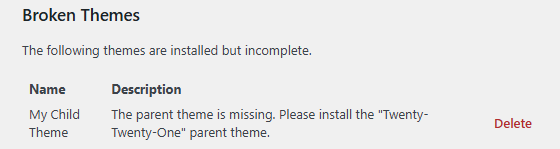
Template: line did in our test. We wrote Twenty-Twenty-One instead of the folder name twentytwentyone, and WordPress listed the child theme as broken.Sources
- WordPress Developer Resources: Child Themes, wp_enqueue_style(), get_stylesheet_uri(), get_parent_theme_file_uri()
- W3C: CSS Cascading and Inheritance Level 4, Cascade Sorting Order
- WordPress.org theme repository: Astra 4.14.3, inc/core/class-astra-enqueue-scripts.php, GeneratePress 3.6.1, inc/general.php
William Lopez is the founder of Odie Themes. He builds the free WordPress tools and themes on this site and has been on WordPress.org since December 2019.
FAQ
Questions
Why is my WordPress child theme style.css not loading?
WordPress never enqueues a child theme's style.css by itself. It reads the Template: line in the header, wires up template fallback, and stops there. Unless the parent theme happens to load the active theme's stylesheet, you have to call wp_enqueue_style inside a function hooked to wp_enqueue_scripts in the child theme's functions.php.
Why is my child theme CSS being overridden by the parent theme?
Your child stylesheet is loading before the parent's, so the parent wins every tie between rules of equal specificity. Pass the parent theme's real handle in the dependency array of wp_enqueue_style so the child file loads last. Use the exact handle: a dependency that is not registered makes WordPress drop the child stylesheet completely.
How do I find my parent theme's stylesheet handle?
Read it off the page source. WordPress prints an enqueued stylesheet as a link tag with id="handle-css", or as a style tag with id="handle-inline-css" when it inlines a small file, so drop the suffix. Examples: astra-theme-css for Astra, generate-style for GeneratePress, twentytwentyfive-style for Twenty Twenty-Five. Twenty Twenty-Four registers no theme stylesheet, so use an empty array.
Should I still use @import in a child theme style.css?
No. It works, but it is slow: the browser cannot start downloading the parent CSS until it has parsed the child CSS, so the two requests run in series instead of parallel. The current WordPress Developer Handbook's child theme page doesn't mention @import at all; its own examples use wp_enqueue_style with get_stylesheet_uri().
What is the difference between get_template_directory_uri and get_stylesheet_directory_uri?
get_template_directory_uri() points at the parent theme folder, and get_stylesheet_directory_uri() points at the active child theme folder. Swap them and you enqueue the parent's style.css a second time while never loading the child's, which looks exactly like a child theme whose styles are not working.