How to Increase the Upload Limit in WordPress on Any Host
Check your current WordPress upload limit, then raise it in the right place for your host: php.ini, .user.ini, .htaccess, cPanel, Nginx or Cloudflare.

To increase the upload limit in WordPress, raise two PHP settings, upload_max_filesize and post_max_size, in the configuration file your host actually reads. That is php.ini on a server you control, .user.ini on most shared hosts that run PHP through PHP-FPM or another FastCGI setup, .htaccess only when Apache runs PHP as a module, or the MultiPHP INI Editor in cPanel. If your server runs Nginx, also raise client_max_body_size. Editing wp-config.php will not change the upload limit.
upload_max_filesize caps the file itself. post_max_size caps the whole POST request the file travels in, together with the other form fields. If the request is larger than post_max_size, PHP hands WordPress empty $_POST and $_FILES arrays, so WordPress never gets to look at the file. That is why the two settings move together in every example below.
The WordPress max upload size tool turns one target size into matching lines, so you can paste instead of typing them by hand. Use its php.ini (or .user.ini) or .htaccess lines for the upload limit, in whichever file your host reads. Nothing placed in wp-config.php can raise the upload limit, for the reason the “Why wp-config.php does not work” section below explains.
Step 1: Check your current upload limit
A theme ZIP, a batch of full-resolution photos, or a video for a landing page is usually what triggers this: the upload bar fills, then WordPress stops it with an error that names no file size at all, just “exceeds the maximum upload size for this site.” Before changing anything, find out what that limit is right now and which setting controls it, so you are not guessing at a number to raise.
- Media > Add New. The upload screen shows the maximum upload file size. This is the number you are trying to raise.
- Tools > Site Health > Info. Expand Media handling. The Site Health documentation lists what it shows there: max size of post data allowed, max size of an uploaded file, and max effective file size, which is the smaller of the two. The Server section shows more PHP values.
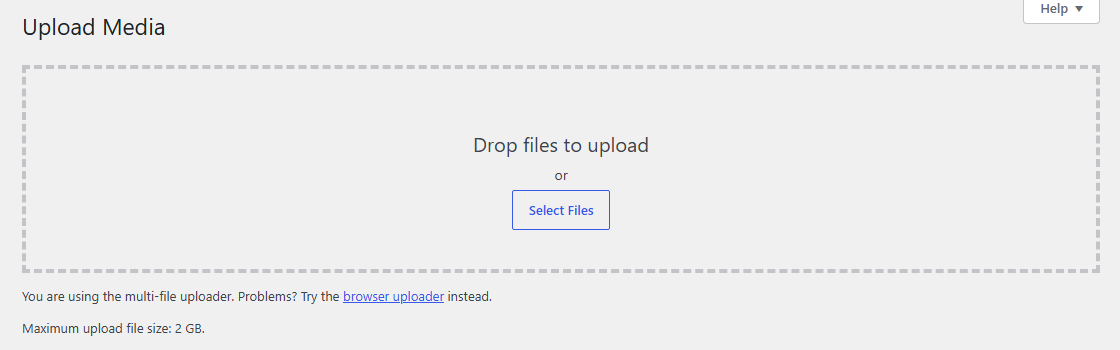
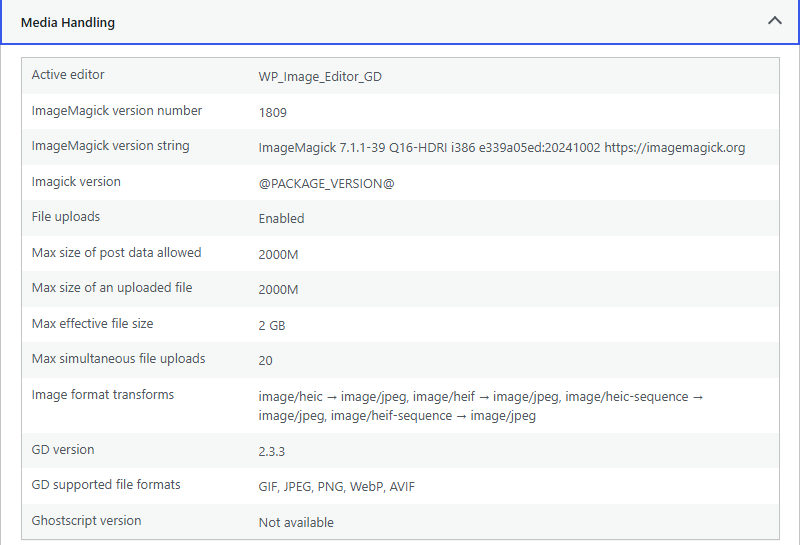
WordPress calculates its limit in wp_max_upload_size(), which reads upload_max_filesize and post_max_size from PHP and uses the smaller one. If one of them is 64M and the other is 8M, your limit is 8M.
The result then passes through the upload_size_limit filter. On a Multisite network, core hooks upload_size_limit_filter() to it, which caps uploads at the network’s “Max upload file size” setting (Network Admin > Settings, 1500 KB by default) and, unless the upload space check is turned off, at the space the site has left. Raising upload_max_filesize and post_max_size on a subsite does nothing until that network setting is also above the size you need. The filter only changes the number WordPress shows and checks. A plugin that returns a bigger number through it can’t get a file past PHP, which still rejects anything over upload_max_filesize before WordPress sees it.
Step 2: Know which settings matter
| Setting | What it limits | PHP default | Where it can be changed |
|---|---|---|---|
upload_max_filesize | The largest single uploaded file | 2M | php.ini, .user.ini, .htaccess, httpd.conf |
post_max_size | The whole POST request, file included | 8M | php.ini, .user.ini, .htaccess, httpd.conf |
memory_limit | Memory PHP can use while running | 128M | Anywhere, including wp-config.php, unless the host locks it |
max_execution_time | Seconds a script may run | 30 | Anywhere, including wp-config.php |
client_max_body_size (Nginx) | The request body Nginx will accept | 1m | Nginx config only |
The PHP defaults and change modes come from the php.ini directives list; the Nginx default comes from the Nginx core module documentation. Most hosts set higher values than PHP’s defaults, which is why Site Health is the place to read your real numbers.
upload_max_filesize and post_max_size are what PHP calls INI_PERDIR settings: an entry that “can be set in php.ini, .htaccess, httpd.conf or .user.ini” and not from PHP code at runtime, which includes WordPress and anything in wp-config.php. memory_limit does not cap file size, but WordPress needs memory to create resized copies of large images, so a big upload can still fail with a memory exhausted error after it arrives.
How high should you set it?
Decide this before you touch a config file, so you only have to edit it once. Set it to the largest file you actually need to upload, with a little headroom, and keep post_max_size slightly above upload_max_filesize. The PHP manual also says that, generally speaking, memory_limit should be larger than post_max_size. Large uploads take longer, so raise max_execution_time if big files time out on slow connections. For very large files such as long videos or backup archives, uploading through SFTP or a chunked upload plugin is usually more reliable than one huge browser upload, and a Cloudflare plan limit may rule out the browser route anyway.
The steps below use 128M and 130M as a working example. Swap in your own target size, or let the max upload size tool write the matching php.ini, .user.ini or .htaccess lines for whatever number you pick.
Step 3: Raise the limit in the right place for your host
| Your setup | Where to set it | Notes |
|---|---|---|
| VPS or dedicated server | The php.ini your PHP actually loads | Restart PHP-FPM or Apache afterwards |
| Shared host using PHP-FPM or FastCGI | .user.ini in the WordPress root | Can take up to 5 minutes to apply |
| Apache with PHP as a module (mod_php) | .htaccess with php_value | Without an <IfModule> wrapper, a 500 error under PHP-FPM or FastCGI |
| cPanel host | Software > MultiPHP INI Editor | Writes php.ini, .user.ini or .htaccess for you |
| Nginx in front of PHP | client_max_body_size as well as the PHP values | Otherwise Nginx returns 413 |
| Managed WordPress host | The host’s dashboard or support | Some hosts cap uploads at platform level |
| Site behind Cloudflare | Cloudflare’s own upload limit | 100 MB on Free and Pro plans |
php.ini (server you control)
Find the loaded file first. Create a temporary file containing <?php phpinfo();, open it in a browser, read the “Loaded Configuration File” line, then delete the file. Edit that php.ini:
upload_max_filesize = 128M
post_max_size = 130M
max_execution_time = 300
Then restart PHP so it reads the change. With PHP-FPM, the service name includes the version, for example sudo systemctl restart php8.3-fpm on Debian or Ubuntu. With mod_php, restart Apache.
.user.ini (most shared hosting)
PHP reads .user.ini files only when it runs as CGI or FastCGI, which includes PHP-FPM. In those setups PHP runs as its own process that Apache or Nginx passes requests to, instead of living inside Apache as mod_php. Create or edit .user.ini in the folder that contains wp-config.php:
upload_max_filesize = 128M
post_max_size = 130M
PHP rereads these files every user_ini.cache_ttl seconds, which defaults to 300. Wait five minutes before deciding it did not work, or restart PHP-FPM if you can.
.htaccess (Apache with mod_php only)
<IfModule mod_php.c>
php_value upload_max_filesize 128M
php_value post_max_size 130M
</IfModule>
The PHP manual describes php_value for PHP running as an Apache module. Without that module Apache doesn’t know the directive, and Apache’s .htaccess tutorial says an unknown word in .htaccess produces a server error (HTTP 500) when overrides are allowed. The <IfModule> wrapper skips the lines when mod_php isn’t loaded, which avoids the 500 but also means nothing changes, so on a PHP-FPM or FastCGI host use .user.ini instead. On PHP 7 the module file is mod_php7.c, so write <IfModule mod_php7.c> there.
If the same .htaccess already holds WordPress’s permalink rules, add these lines as a separate block rather than editing those rules. Our guide to the default WordPress .htaccess file shows what WordPress’s own block looks like, so you can tell your addition apart from it.
cPanel MultiPHP INI Editor
In cPanel, open Software > MultiPHP INI Editor, choose your domain, and change the values in Basic Mode. According to cPanel’s documentation, Basic Mode saves to the php.ini, .user.ini and .htaccess files where each one supports the setting, so you do not need to know which one your server uses.
Nginx
Nginx checks the request size before PHP sees it. When a request is larger than client_max_body_size, Nginx returns 413 Request Entity Too Large. The default is 1m. Add a value at least as large as post_max_size in your server block:
client_max_body_size 130M;Test and reload with sudo nginx -t && sudo systemctl reload nginx. On Apache, the comparable setting is LimitRequestBody. Its documentation gives the current default as 1 GiB (1073741824 bytes) and says that in Apache 2.4.53 and earlier the default was 0, meaning unlimited. It rarely needs changing on standard WordPress hosting unless you are raising uploads past 1 GiB.
Managed hosts and Cloudflare
A managed WordPress host can ignore your php.ini or .user.ini and set the limit for the whole platform; this varies by host, and some do not. If Site Health still shows the old number after your change, ask your host what the maximum is and whether they can raise it.
If the site runs through Cloudflare, Cloudflare has its own limit. Its default cache behavior documentation lists maximum upload sizes of 100 MB on Free and Pro plans, 200 MB on Business, and up to 5 GB on Enterprise. No PHP setting can get past that. For bigger files the same page suggests splitting the upload into smaller chunks, uploading through a DNS-only (unproxied) record, or a plan upgrade.
Why wp-config.php does not work
Many articles suggest adding this to wp-config.php, or to a theme’s functions.php:
@ini_set( 'upload_max_filesize', '128M' );
@ini_set( 'post_max_size', '130M' );
Both settings are INI_PERDIR, and PHP’s documentation says a setting of that mode may not be set with ini_set(). The call returns false and the value stays as it was, so the lines run without an error and change nothing, which is easy to miss because nothing looks wrong. The same is true in functions.php or a plugin. Some copies of the snippet use upload_max_size, which is not a PHP setting at all; the php.ini directives list has only upload_max_filesize.
We checked this on 16 November 2026 on WordPress 7.1.4 with PHP 8.3.36 in WordPress Playground, whose own php.ini sets both values to 2000M. With the two lines above the stop-editing line in wp-config.php (asking for 128M and 130M), both ini_set() calls returned false, both settings stayed at 2000M, and wp_max_upload_size() reported the same 2097152000 bytes as without the lines. As a control, ini_set( 'max_execution_time', '300' ) in the same spot did work: it returned the old value and the setting became 300, because that one is an INI_ALL setting.
wp-config.php can still help with the memory side of a big image upload. WP_MEMORY_LIMIT applies to every request. WordPress raises PHP’s limit further, to WP_MAX_MEMORY_LIMIT, on admin screens for administrators, while it processes an image for a user of any role, and during WP-Cron runs. That higher limit defaults to 256M, or to PHP’s own limit if that is already higher, or to your WP_MEMORY_LIMIT if you set that above 256M. If a large photo uploads and then fails while WordPress makes its resized copies, raising it can help:
define( 'WP_MAX_MEMORY_LIMIT', '512M' );Our wp-config.php guide shows where that line goes, and the wp-config.php generator writes the everyday WP_MEMORY_LIMIT line together with other common settings; WP_MAX_MEMORY_LIMIT you add by hand. The behavior above is from WordPress’s wp_raise_memory_limit() and the WordPress 7.1.4 source, read rather than run. None of it changes the maximum upload file size, which is still set by upload_max_filesize and post_max_size in php.ini, .user.ini or .htaccess.
Step 4: Confirm the change
Reload Media > Add New and check that the maximum upload file size shows your new value. If it does not:
- Check that
post_max_sizeis larger thanupload_max_filesize. WordPress uses the smaller one. - Confirm you edited the file PHP actually loads. A
php.iniin the wrong folder is ignored. - Wait five minutes for a
.user.inichange, or restart PHP-FPM. - On a Multisite subsite, check the network’s “Max upload file size” setting.
- If the number in WordPress changed but uploads still fail with 413, the block is in Nginx, your host’s proxy or Cloudflare.
- If the upload reaches WordPress and then fails with “HTTP error,” the size is no longer the problem. Our guide to the WordPress HTTP error on image upload covers the usual causes.
When you know your target size, the max upload size tool writes the matching php.ini, .user.ini and .htaccess lines for you; add the Nginx line from this guide yourself if your server runs Nginx.
Sources
- PHP manual: php.ini directives list, post_max_size and memory_limit, Configuration change modes (INI_PERDIR), .user.ini files, How to change configuration settings
- WordPress Developer Resources: wp_max_upload_size(), upload_size_limit filter, upload_size_limit_filter(), wp_raise_memory_limit()
- WordPress documentation: Site Health screen
- WordPress 7.1.4 source code: media.php, ms-functions.php, default-constants.php
- Apache HTTP Server documentation: .htaccess files tutorial, LimitRequestBody
- nginx documentation: client_max_body_size
- cPanel documentation: MultiPHP INI Editor for cPanel
- Cloudflare documentation: Default cache behavior, upload limits
William Lopez is the founder of Odie Themes. He builds the free WordPress tools and themes on this site and has been on WordPress.org since December 2019.
FAQ
Questions
How do I check my current upload limit in WordPress?
Go to Media > Add New. The upload screen shows the maximum upload file size. For the detail behind it, open Tools > Site Health > Info and expand Media handling, which lists the max size of an uploaded file, the max size of post data, and the max effective file size, which is the smaller of the two.
Why does WordPress say the uploaded file exceeds the upload_max_filesize directive in php.ini?
The file is larger than PHP's upload_max_filesize setting. WordPress does not set this limit, it reads it from PHP. Raise upload_max_filesize and post_max_size together in php.ini, .user.ini or, on Apache with mod_php, .htaccess. PHP's own default for upload_max_filesize is only 2M, although most hosts set a higher value.
Can I increase the upload limit from wp-config.php?
No. upload_max_filesize and post_max_size are INI_PERDIR settings, which PHP only accepts from php.ini, .htaccess, httpd.conf or .user.ini. In our test on 16 November 2026 (WordPress 7.1.4, PHP 8.3.36, WordPress Playground), both ini_set() calls in wp-config.php returned false and the limit did not move. wp-config.php can raise WordPress's memory limit, but memory is not what caps the file size.
Why do I still get 413 Request Entity Too Large after raising the PHP limits?
Something in front of PHP is rejecting the request. On Nginx it is client_max_body_size, which defaults to 1m and returns a 413 error when exceeded. Raise it in the server block and reload Nginx. If your site runs through Cloudflare, its plan limit on upload size can also stop the request before it reaches your server.
Does post_max_size need to be larger than upload_max_filesize?
Yes. The PHP manual says post_max_size must be larger than upload_max_filesize to upload large files, because the file travels inside a POST request together with the other form fields. When a request is bigger than post_max_size, PHP hands over empty $_POST and $_FILES arrays. WordPress uses the smaller of the two values as its limit, so raising only upload_max_filesize leaves the limit where it was.