MagazineCraft Lightweight WordPress Magazine Theme
A Tailwind-built magazine theme with a responsive post grid and a cover or category banner
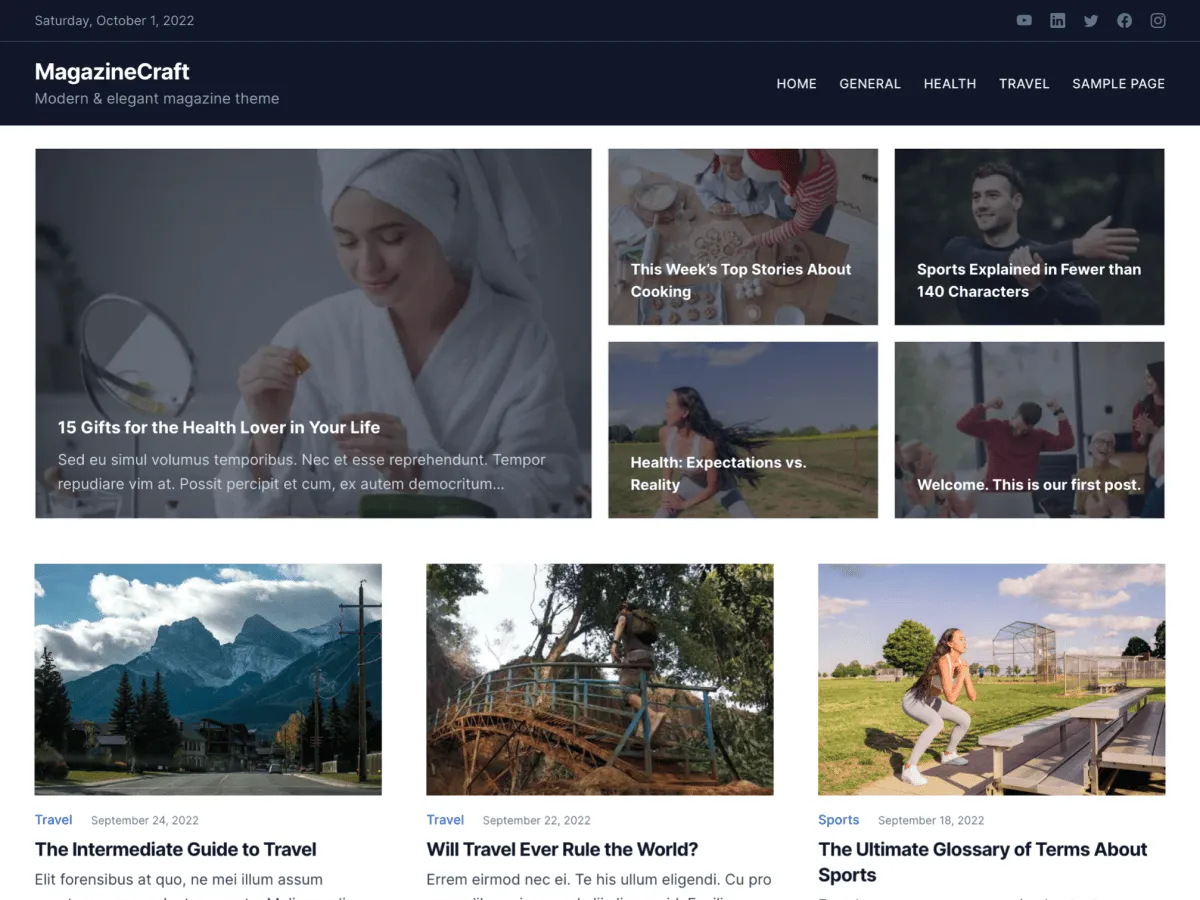
What MagazineCraft is for
MagazineCraft is the newest of the five classic Odie Themes themes, first listed on WordPress.org in September 2022. It is styled with Tailwind CSS, and its listing pages show posts as cards in a responsive grid — three across on large screens, two on tablets and one on phones.
The list of posts opens with one of two banners: on the front page when Settings → Reading shows your latest posts, or on the posts page when you use a static front page. Type 1 is a cover: a background image with a title, description and button you write yourself, which suits a site that wants to introduce itself. Type 2, the default, pulls the five newest posts from a category you choose. Above the banner sit a top bar with the date and social links, and one of two header designs.
Its fonts are fetched once and then served from your own server through the WPTT webfont loader, as long as WordPress saves files directly rather than over FTP; the 1.0.1 changelog calls this “Load web fonts locally”. Where WordPress uses FTP, version 1.0.2's loader can stop front-end pages with a critical error instead (see Troubleshooting in the setup guide). Version 1.0.2, from 1 October 2022, is the current release. WordPress.org reports 100+ active installations and no ratings yet.
Who it suits
Entertainment, lifestyle or general magazine sites that want an image-led grid of posts and a large opening banner, and owners who would rather not have page views request fonts from Google (that needs a server where WordPress saves files directly, not over FTP).
What's in MagazineCraft
- Three-column post grid on wide screens, two on tablets, one on phones
- Two banner styles above the list of posts: a cover with your own title, text, button and background image, or five posts from a chosen category
- Header top bar with the date and links to six social networks, plus two header designs
- Fonts saved to your own site when WordPress saves files directly, not over FTP (Inter by default, or Lora, Barlow Semi Condensed or Playfair Display)
- Wide or boxed layout, a primary colour picker and two footer designs
- WooCommerce support with product gallery zoom, lightbox and slider
MagazineCraft at a glance
- Theme type
- Classic theme (set up in the Customizer)
- Current version
- 1.0.2
- Current version released
- October 1, 2022
- Listed on WordPress.org since
- September 26, 2022
- Requires WordPress
- 5.6
- Tested up to WordPress
- 6.0
- Requires PHP
- 5.6
- Active installs
- 100+
- Rating on WordPress.org
- No ratings yet
Version, dates, installs and ratings come from the WordPress.org theme directory; requirements come from the theme's readme. Checked on November 16, 2026.
Good to know before you install
- There is no sidebar column. The widget area called “Sidebar” is displayed as a full-width band of up to three columns below the content on posts, pages and archives.
- Its readme lists WordPress 5.6 and PHP 5.6 as minimums and says it was tested up to WordPress 6.0. It is a classic theme without Site Editor support.
- The “Theme: MagazineCraft” credit in the footer is printed by the theme's footer functions and has no Customizer switch; a child theme can replace it.
- After activation the dashboard shows a welcome notice that links to this documentation.
Next steps
Free tools to set up your site
WordPress Image Size Lab
Drop an image in. See every copy WordPress will make of it.
Open toolDisable WordPress -scaled Images
Stop WordPress silently shrinking your big uploads
Open toolWordPress .htaccess Generator
The rules WordPress needs, plus the hardening rules it does not ship with
Open toolGuides
Fixes that apply to classic themes
- WordPress Child Theme Not Working? Fix CSS Not Loading MagazineCraft loads its CSS from the parent folder, so a child theme keeps its styling with no enqueue code. The guide covers the parent themes that do need one.
- WordPress Featured Image Size: 1200×630 + How to Find Yours The theme decides which image size each template shows. The guide shows how to find that size before you upload.
- WordPress Block Theme vs Classic Theme: Honest Comparison What you keep and what changes if you move this site to a block theme later.
Related
Other themes you might like
FAQ
MagazineCraft questions
Which version of MagazineCraft is current, and what does it need?
Version 1.0.2, released on WordPress.org on 1 October 2022. Its readme lists WordPress 5.6 and PHP 5.6 as minimums and says it was tested up to WordPress 6.0.
How do I choose between the cover banner and the posts banner?
Appearance → Customize → Frontpage Options → Banner Options → Banner Design. Type 1 shows a cover with your own Banner Title Text, Banner Description Text, Banner Button Text, Banner Button Link and Banner Background Image. Type 2 (the default) shows five posts from the category set in Banner Posts Category, or your latest posts if none is set. “Check to show the banner section on frontpage” turns the banner off entirely. The banner sits above the list of posts, so with a static front page it appears on the posts page instead.
Where do widgets appear in MagazineCraft?
The theme registers one widget area, Sidebar. Despite the name it is not a side column: it is printed as a full-width band below the main content, with the widgets arranged in up to three columns. It only appears once it has at least one widget.
Does MagazineCraft load fonts from Google?
Not when WordPress can save files directly. You can tell it does when it installs plugins without asking for FTP details and wp-config.php has no FTP_HOST, FTP_USER or FTP_PASS lines. The theme's WPTT webfont loader then downloads the Google Fonts files once into wp-content/fonts and serves them from your own site. If it cannot write there, the theme links the font from fonts.googleapis.com on every page view. On a server where WordPress installs plugins over FTP (it asks for FTP details, or they are saved in wp-config.php) and PHP has its ftp extension, version 1.0.2's font loader stops every front-end page with a critical error instead (seen on PHP 8.4; older PHP may behave differently): see Troubleshooting in the setup guide. You choose the font under Design Options → Font Options: Default (Inter), Option 1 (Lora), Option 2 (Barlow Semi Condensed) or Option 3 (Playfair Display).
What happened to MagazineCraft PRO?
The PRO version is discontinued and old links to it now lead to this page. The free version on WordPress.org, described here, is the one to install.